The Heart of Search Console Debugging
The URL Inspection Tool (accessible via the top global search bar in Search Console) provides a direct probe into Google’s database for any specific URL within your verified property.
When you enter a URL, GSC queries the live Google Index and returns the exact state of that page as of its last recorded crawl.
Anatomy of the URL Inspection Verdict
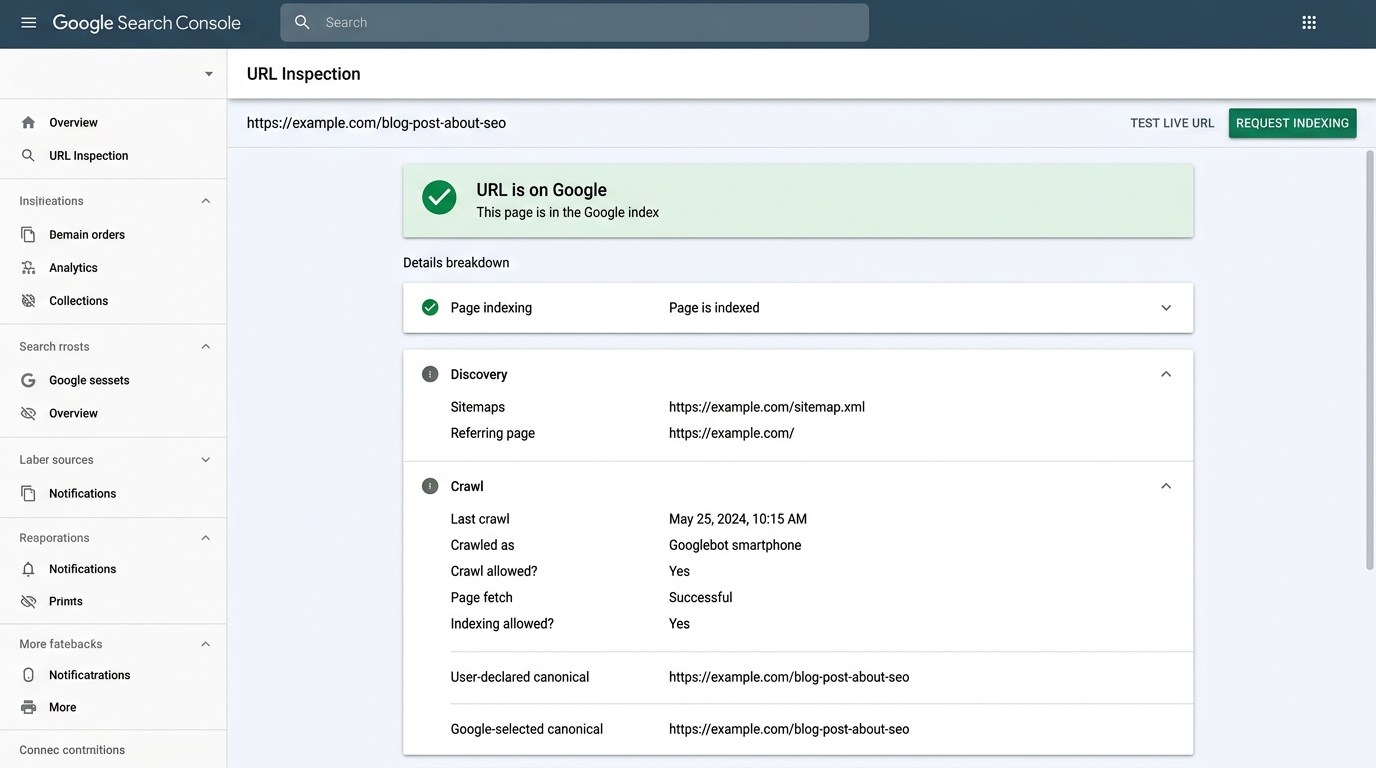 Figure 1.1: The URL Inspection dashboard demonstrating the ‘URL is on Google’ status, Discovery routes, crawl metadata, and canonical consensus diagnostics.
┌────────────────────────────────────────────────────────────────────────┐
│  URL is on Google / URL is not on Google                              │
│  "It can appear in Google Search results (if not subject to manual     │
│   action or removal request)"                                          │
└────────────────────────────────────────────────────────────────────────┘
The verdict summary is followed by three critical telemetry panels:
- Presence on Google
- Page Indexing (Coverage Details)
- Enhancements & Structured Data
Diagnostic Checklist: Key Fields & What They Mean
1. Discovery
- Sitemaps: Lists which submitted XML sitemaps referenced this URL. If empty, Google discovered this URL via links rather than your sitemap feed.
- Referring page: The external or internal URL Googlebot traversed to discover this link. If this says “None detected,” Google discovered it through a previously indexed version or a private link graph.
2. Crawl Telemetry
- Last crawl: Precise UTC timestamp of Googlebot’s most recent fetch. If this date is weeks old, Google has deprioritized recrawling this page.
- Crawled as:
Googlebot smartphone(Primary mobile-first indexing bot)Googlebot desktop(Rare, typically reserved for resources that are restricted to desktop user agents)
- Crawl allowed?: Checks whether your
robots.txtrules permitted the crawl. (YesvsNo: blocked by robots.txt). - Page fetch: The HTTP transport result:
Successful(HTTP200)Failed: Not found (404)Failed: Server error (5xx)Failed: Redirect error
- Indexing allowed?: Checks whether
<meta name="robots" content="noindex">or anX-Robots-Tag: noindexheader was returned.
3. Canonicalization
This is the most critical technical diagnostic in the report:
- User-declared canonical: The exact URL your code placed in
<link rel="canonical" href="...">. - Google-selected canonical: The URL Google chose as the authoritative master copy.
Step-by-Step Diagnostic Workflow
[ Step 1: Input URL in Top Bar ]
               │
               ▼
   [ Check "Last Crawl" Date ]
         ├── If older than recent deploy ──> Run "Test Live URL"
         └── If recent ──> Inspect Canonical & Coverage
               │
               ▼
[ Compare User Canonical vs Google Canonical ]
         ├── Match ──> Page Canonicalized Correctly
         └── Mismatch ──> Investigate duplicate signals, redirect loops